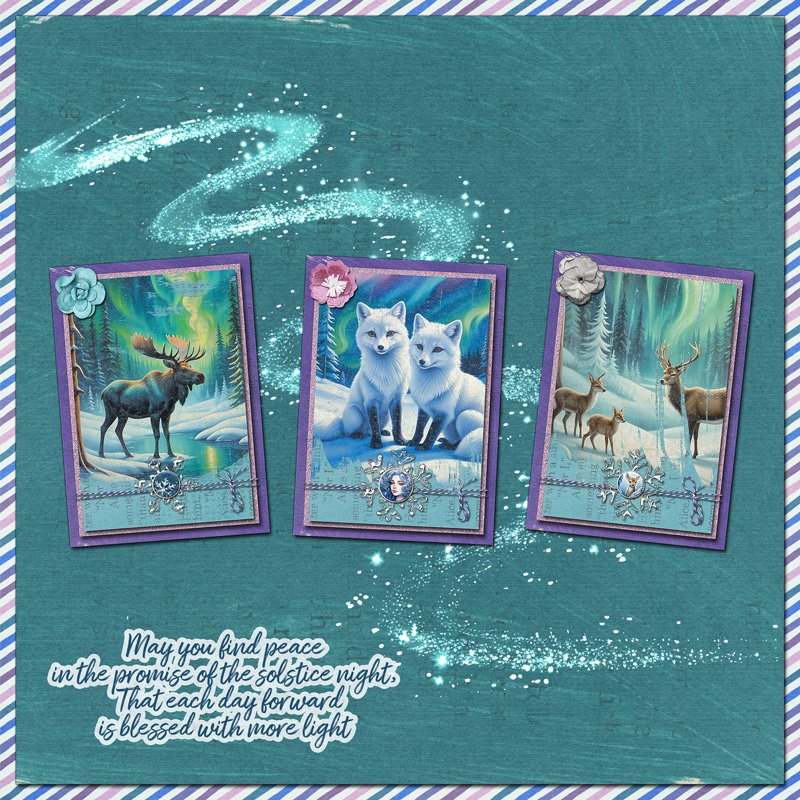
I love artist trading cards (ATCs) and I've made and traded several traditional paper ones with friends. When I'm making them by hand instead of digitally, I love adding dimensional layers and embellishments, so I decided to do that in my digital ones, too!
To create these ATCs, I started by making a canvas in Photoshop that is artist trading card size: 2.5" x 3.5" -- the same size as sports trading cards, like the ones for baseball players. I selected a solid purple painted paper for the background. Then, I created a pink glitter paper by stamping a glitter element from the Mark Making Bits over and over until it covered it, and used that as the next layer. The third layer is an aqua painted solid paper with text showing and it's the layer that most of the rest sits on.
Next, I added the moose, fox, or deer transfers to the card. Then I tied purple and white baker's twine around the top two paper layers. To do this, I selected the boundaries of the pink glitter paper layer and then expanded that by 5 pixels and used the expanded selection as a layer mask. That way, the twine seems to extend just beyond the glitter layer, as if it is physically wrapped around it. Over top of that, I added an icy snowflake and a cheerful brad. And then I placed a dimensional flower in the upper left of each ATC.
For the overall layout, I selected a teal painted paper, and slid a striped paper underneath it. I added a magic glitter swirl, and the word art. Then I arranged the 3 artist trading cards on top.