Oscraps

You are using an out of date browser. It may not display this or other websites correctly.
You should upgrade or use an alternative browser.
You should upgrade or use an alternative browser.
*Please read last post* Replace image without having to redo credits and description?
- Thread starter hoodsmom
- Start date


taxed4ever
Crazy about the "O"
Yes there is all you have to do is go to your gallery then your content find the image you want to replace and then change media. you can upload the image you want and that should be all you have to do.

Good to know! Thanks!

@hoodsmom Yes, here are the steps:
My original layout with credits:
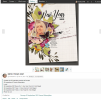
2. After you click the Change Media link, you click the Upload file link

3. The Credit box itself is blank but if you look at the next step below you will see that they do come across okay.
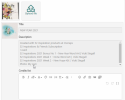
4. New layout plus all the credits from step 1 above, everything in the Description and Credits box.
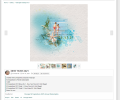
Hope that helps.
My original layout with credits:
2. After you click the Change Media link, you click the Upload file link
3. The Credit box itself is blank but if you look at the next step below you will see that they do come across okay.
4. New layout plus all the credits from step 1 above, everything in the Description and Credits box.
Hope that helps.


Unfortunately, that’s behind our control.Thanks. Just tried it and I get it now. I wish there were a disclaimer such as "you can also make changes to credits, etc. as well" or a way for the site to repopulate the description, credits etc so it's clear they haven't been wiped out.
Hmmm … let me see if there is something in the permissions settings for this, because right now you’re right.a question - is it possible that you can't use this for pages in an album?
i can’t seem to find the option to Change Media … is it under the 3 dots?

No Vicki ... Ona posted a photo in this thread
layout in an album
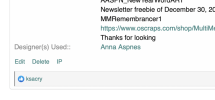
layout in the cheery o gallery
Replace image without having to redo credits and description?
Hi all, Is there a way to replace an image without having to also replace the description? I figured out how to replace the image, but I had to retype all the credits.
oscraps.com
layout in an album
layout in the cheery o gallery
It appears that way ... I can't find a permission setting that would affect this.a question - is it possible that you can't use this for pages in an album?
 After we recover from all the new year admin stuff, I'll talk to Vicki S about it.
There doesn't appear to be a way to do the pages in an album. It shows you can edit your own images in an album already so I'm not sure where that pulls from

easyeyes4you
Well-Known Member
OK, I'll try that... i clicked on edit...@hoodsmom Yep, what Trudy said above............. hadn't done that before so went and tried and it worked perfectly, so use the Change media option not Edit. You can change out your layout and the credits stay as they are. Thanks Trudy!! xxx
easyeyes4you
Well-Known Member
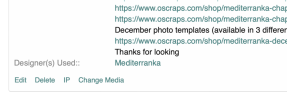
I couldn't find the change media box.. I knew I needed the upload thing to find the image I wanted to use, and no matter where I went I did not see one... .Going to go finish what I have in the works and come back and re read all of this... It can't be as hard as I am makign it...@hoodsmom Yes, here are the steps:
My original layout with credits:
View attachment 362524
2. After you click the Change Media link, you click the Upload file link
View attachment 362525
3. The Credit box itself is blank but if you look at the next step below you will see that they do come across okay.
View attachment 362528
4. New layout plus all the credits from step 1 above, everything in the Description and Credits box.
View attachment 362527
Hope that helps.
easyeyes4you
Well-Known Member
Trudy, I did not find a change media button??? Ended up just re doing.... Can you tell me where I find the change media button... I know Wombat has posted a step by step tutorial here, I saw, after I wrote my question... Going to look at it carefully...Yes there is all you have to do is go to your gallery then your content find the image you want to replace and then change media. you can upload the image you want and that should be all you have to do.
I have gone and looked again... I go to the gallery and click on my content, which takes me just to the info on my page, but there is no change media option??? If there had been we woudln't be having this conversation... I knew I had to change the media/image, but there was just no place that was giving me the download options, so could not search to find the file I wanted...
Last edited:
easyeyes4you
Well-Known Member
going to look one more time....I couldn't find the change media box.. I knew I needed the upload thing to find the image I wanted to use, and no matter where I went I did not see one... .Going to go finish what I have in the works and come back and re read all of this... It can't be as hard as I am makign it...
easyeyes4you
Well-Known Member
Actually I can see in your screen shot, change Media... it does not exist on my page... I only have the first 3 options... Could it be the browser... doesn't most everyone use Chrome???@hoodsmom Yes, here are the steps:
My original layout with credits:
View attachment 362524
2. After you click the Change Media link, you click the Upload file link
View attachment 362525
3. The Credit box itself is blank but if you look at the next step below you will see that they do come across okay.
View attachment 362528
4. New layout plus all the credits from step 1 above, everything in the Description and Credits box.
View attachment 362527
Hope that helps.
@easyeyes4you I had to have a giggle here Liz, sorry. Seems like you are talking to yourself as no one is answering you. lol! Unfortunately with the software upgrade last year that option apparently has disappeared. We don't have any control over what options are replaced or done away with when it comes to software upgrades. So bottom line, you can't change out the layout after it has been posted in the gallery, all you can do is delete and then upload it again to one gallery.
So bottom line, you can't change out the layout after it has been posted in the gallery, all you can do is delete and then upload it again to one gallery.
easyeyes4you
Well-Known Member
Well, I had quite a few conversations... too bad it went away... I did try it on another computer... same thing. I had a funny thing going on at Shutterfly a couple of days ago... Was building a calendar and could not drag the images onto the project... totally in Shutterfly... and every time I tried, I got a pop-up from Eagle and it would load the photo to Eagle, which I am now using as a catalog... Eagle is on my computer, but in no way was it open... Thank goodness my son is my IT... he came in and looked around, figured out what I was doing... then he found that there was something enabled in chrome that allowed me to add anything at any time to Eagle... he shut it off and all was good... So you see where I was... figuring it had to be something I was not even aware of.. such as an upgrade that did away with your workaround....@easyeyes4you I had to have a giggle here Liz, sorry. Seems like you are talking to yourself, as no one is answering you. lol! Unfortunately with the software upgrade last year that option apparently has disappeared. We don't have any control over what options are replaced or done away with when it comes to software upgrades.

Well goodness, you sure have had a time with that!! I will go and put a little note at the top of this thread that the change out a layout option no longer exists, maybe it might come back in the next upgrade! lol! who knows!!!Well, I had quite a few conversations... too bad it went away... I did try it on another computer... same thing. I had a funny thing going on at Shutterfly a couple of days ago... Was building a calendar and could not drag the images onto the project... totally in Shutterfly... and every time I tried, I got a pop-up from Eagle and it would load the photo to Eagle, which I am now using as a catalog... Eagle is on my computer, but in no way was it open... Thank goodness my son is my IT... he came in and looked around, figured out what I was doing... then he found that there was something enabled in chrome that allowed me to add anything at any time to Eagle... he shut it off and all was good... So you see where I was... figuring it had to be something I was not even aware of.. such as an upgrade that did away with your workaround....
easyeyes4you
Well-Known Member
Yes, I did... the funny thing is, every time I came back here to look again, I read something I had not seen before... VERY scattered this evening; it has been a VERY long day... and things like this have become a part of my daily life... Thanks for your help... or not!Well goodness, you sure have had a time with that!! I will go and put a little note at the top of this thread that the change out a layout option no longer exists, maybe it might come back in the next upgrade! lol! who knows!!!
